
Details
DRM: Digitales Wasserzeichen
Weitere Details
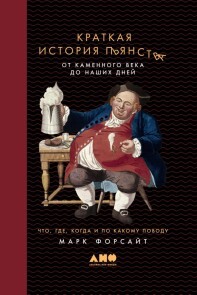
A Short History of Drunkeness: A Short History of Drunkenness: How, Why, Where, and When Humankind Has Gotten Merry from
eBook
Beschreibung
E-Book Informationen
E-Books in diesem webshop können in den Dateiformaten EBUB und PDF vorliegen und ggf. mit einem Kopierschutz versehen sein. Sie finden die entsprechenden Informationen in der Detailansicht des jeweiligen Titels. E-Books ohne Kopierschutz oder mit einem digitalen Wasserzeichen können Sie problemlos auf Ihr Gerät übertragen. Sie müssen lediglich die Kompatibilität mit Ihrem Gerät prüfen.
Zum Öffnen von E-Books, die mit dem Kopierschutz Readium LCP versehen sind, beachten Sie bitte folgende Hinweise:
Öffnen auf einem E-Reader:
Beim ersten Öffnen auf Ihrem Reader erscheint ein Hinweisfenster mit der Aufforderung, ein Passwort einzugeben. Gleichzeitig wird ein Infofeld angezeigt, in dem das Passwort steht. Geben Sie dieses Passwort in das Eingabefeld ein und bestätigen Sie die Eingabe. Anschließend öffnet sich das E-Book automatisch.
Öffnen auf Laptop, Tablet oder Smartphone
Um ein E-Book mit Readium LCP-Schutz auf einem Tablet, Laptop oder Smartphone zu lesen, benötigen Sie ein Programm, das den Kopierschutz Readium LCP unterstützt. Geeignete Programme sind z.B. der Thorium Reader (für Windows, macOS oder Linux) oder die PocketBook App (ios und Android). Installieren Sie eines dieser Programme auf Ihrem Gerät. Öffnen Sie das Programm und fügen Sie das heruntergeladene E-Book hinzu (z.B. über "Importieren" oder "Öffnen"). Beim ersten Öffnen erscheint ein Hinweisfenster mit der Aufforderung zur Eingabe eines Passworts. Das Passwort wird Ihnen gleichzeitig in einem separaten Infofeld angezeigt. Geben Sie das Passwort ein und bestätigen Sie die Eingabe. Das E-Book wird automatisch geöffnet.